Create your product
Choose a name, instruments, description and subscription terms. Set up your analysis page under your own brand.
Turn your analysis into a standalone product. Publish market reviews, mark levels and scenarios on charts, provide access through your own website and manage the service from one cabinet.
Choose a name, instruments, description and subscription terms. Set up your analysis page under your own brand.
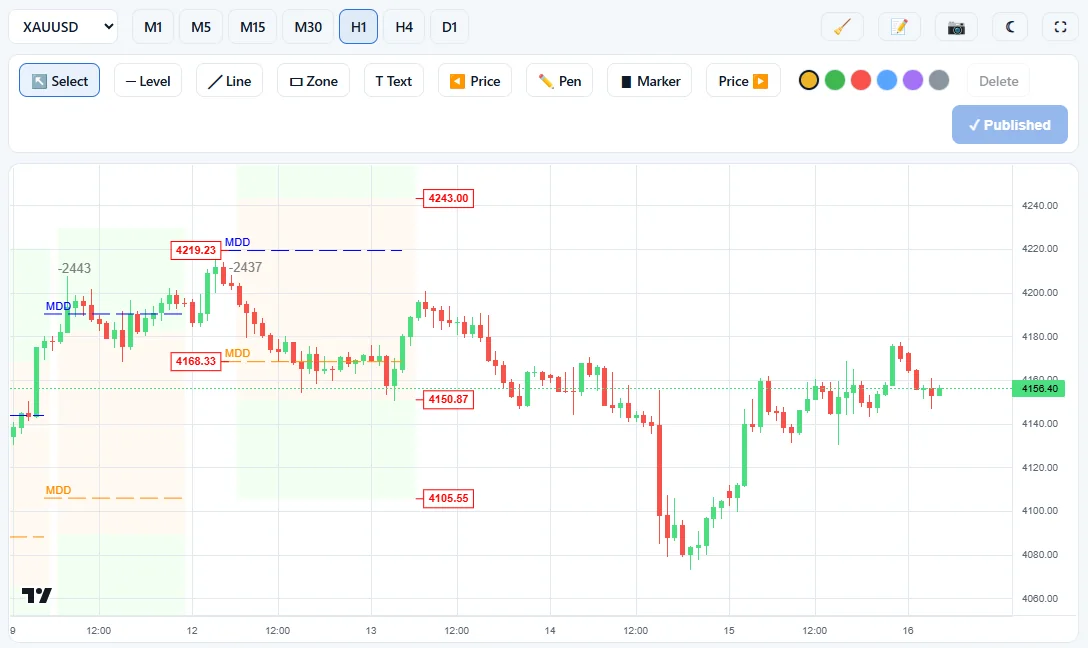
Write a forecast, add images and files, and annotate the chart. Publish immediately or schedule a publication time.
Clients register on your website and obtain product access. Forecasts and charts are available in the browser; annotations can also be received through an MT4/MT5 indicator.
Text, images and files in one publication. Drafts help you prepare materials before releasing them.
Live quotes, levels, lines, zones and labels help you illustrate your market view.
The publisher robot sends annotations from your terminal. Subscribers receive them on their charts through an indicator.
Prepare a forecast in advance and set its publication time to release materials when needed.
Paid and trial access, subscription periods and subscriber management in the trader cabinet.
Connect Telegram, Discord, VK and webhooks to publish materials. Check available settings and publishing terms in the cabinet.
Joining the platform is free. You choose your product description, subscription periods and prices. The platform earns a commission from subscriber payments; your individual terms are shown and accepted in the cabinet before the first paid subscription. Social publishing is an optional, separately paid service.
Subscribers can view forecasts and interactive charts in the browser. Sending annotations from MT4/MT5 requires a running terminal with the publisher robot; receiving them in a subscriber terminal requires the indicator. Analysis supports market research: clients make their own trading decisions.
No trading account is needed to view forecasts and charts in the browser. Receiving annotations in MT4/MT5 requires a terminal with the indicator.
Yes. The product is hosted on your website with your design, on the trader's domain or subdomain.
Yes. Save drafts, publish immediately or schedule a forecast for a specific time.
Display depth can be set up to 365 days. It shows the product's available history; the setting itself does not create past annotations.
The Analysis product provides forecasts and annotations. Automatic trade copying is offered through a separate Signals product.
Create a product, publish your first forecast and offer your audience access to your work.
Create an analysis product